Mobile
The mobile stack debate is still alive in 2026, but the answer is less "native or cross-platform" and more "how much do you share, and where?"
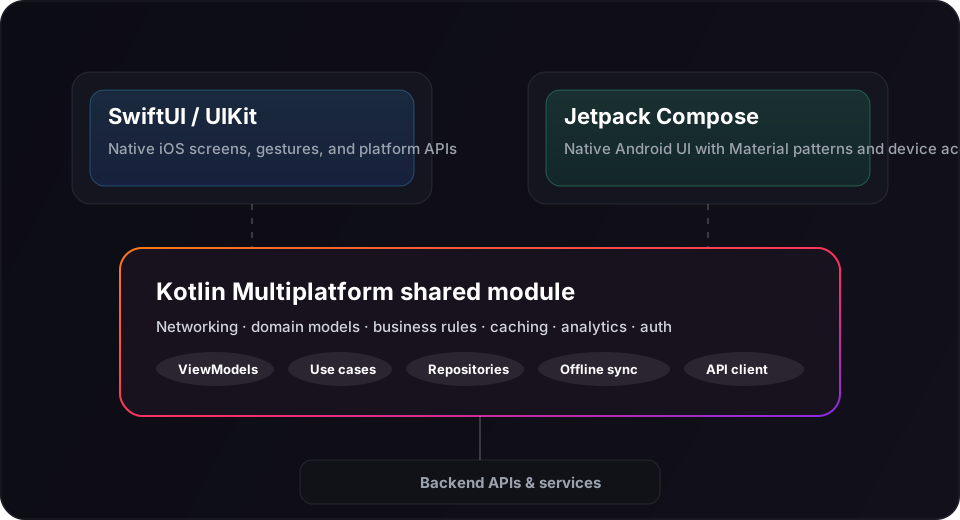
At Appflare, we build with native Swift on iOS and native Kotlin on Android. When both platforms need the same product, we share business logic through Kotlin Multiplatform (KMP) instead of rewriting it twice. That gives you real native UI and performance, with less duplication than fully separate codebases.
We prefer this over React Native for most apps we ship. React Native is still a valid option, and we'll recommend it when the constraints fit. The right choice depends on your timeline, team, and the kind of interactions your app needs.

Three realistic paths
Most teams we talk to are choosing between three approaches:
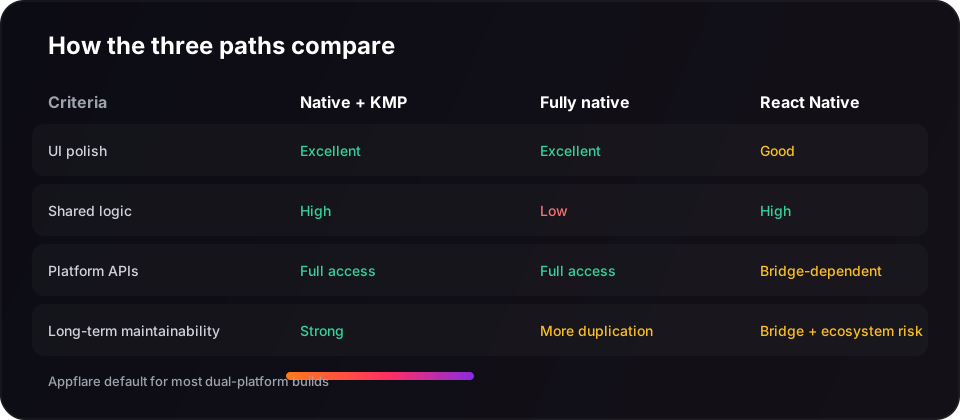
- Fully native: separate Swift and Kotlin codebases, no shared module. Best when platforms diverge heavily or you only ship one OS first.
- Native UI + Kotlin Multiplatform: SwiftUI/UIKit and Jetpack Compose on top, with shared Kotlin for networking, domain logic, caching, and analytics. This is our default for dual-platform builds.
- React Native: one JavaScript/TypeScript UI layer across iOS and Android. Strong when speed-to-market and web-style hiring matter more than deep native integration.
Why we prefer Kotlin Multiplatform over React Native
React Native has matured, but for products where quality and longevity matter, KMP solves a different problem more cleanly:
- UI stays native. Animations, navigation, accessibility, and platform conventions come from SwiftUI/Compose, not a bridge.
- Shared code is the right shared code. You centralize business rules, API clients, offline sync, and validation, not every screen and gesture.
- Fewer bridge surprises. Heavy camera, Bluetooth, background tasks, and low-level APIs are easier when each platform owns its UI layer.
- Easier to evolve. You can start iOS-only, add Android later, and grow the shared module without rewriting the whole app in a new paradigm.
That does not mean React Native is wrong. It means we reach for KMP first when a client wants both platforms with native feel and a maintainable shared core.
When each option makes sense
| Choose this | When |
|---|---|
| Native + KMP | You want iOS and Android with native UX, shared product logic, and room to grow without a JS bridge in the middle. |
| Fully native | Platform experiences are very different, you ship one OS first, or hardware integrations dominate the roadmap. |
| React Native | You need both platforms quickly, already have a strong React team, or the app is mostly forms, feeds, and standard UI patterns. |
How we structure a KMP project
A typical Appflare mobile build looks like this:
iosApp/          SwiftUI screens + platform services
androidApp/      Compose screens + platform services
shared/          Kotlin Multiplatform module
  domain/        models, use cases, validation
  data/          repositories, API client, caching
  presentation/  shared view models / state
The shared module owns the product brain. Each native app owns rendering, navigation, push permissions, biometrics, and anything that should feel unmistakably iOS or Android.
What we usually share in KMP
- Authentication flows and token refresh
- REST/GraphQL clients and response mapping
- Offline queues and sync rules
- Feature flags, experiments, and analytics events
- Pricing logic, entitlements, and paywall state
What we usually keep native
- Screen layout, motion, and haptics
- Camera, HealthKit, widgets, and OS-specific extensions
- App Store / Play Store submission assets and platform settings
- Deep links, notifications, and background execution

React Native still belongs in the conversation
If your team already ships React Native successfully, or you need a small team to cover web and mobile together, RN can be the pragmatic call. We have no religious objection to it.
We just see fewer long-term compromises when native UI handles the experience and KMP handles the shared product logic underneath. When clients ask us to compare both paths, we lay out the tradeoffs honestly and let them choose.
Don't pick a stack because of a blog post headline. Pick it because of your timeline, your team, and the interactions your users will feel every day.
Our recommendation
For most dual-platform products in 2026, we recommend:
- Swift for iOS UI
- Kotlin / Jetpack Compose for Android UI
- Kotlin Multiplatform for shared business logic
- React Native only when team skills or delivery constraints clearly favor it
If you're weighing options for a new app or a rebuild, talk to us. We'll map the stack to your roadmap and help you choose the path you'll still be happy maintaining two years from now.